Computer Networks · TEE · papers
Q3C · WWW and HTTP
Final · 5 December 2025
TEE · Actual TEE paper · all questions · current syllabus 702AI0C023
Actual PYQ · Q3C. Explain, with the help of a neat diagram, how the World Wide Web (WWW) enables users to access online information through the HTTP protocol. Describe the components and working mechanism of the Web, and interpret how HTTP facilitates communication between a client and a server when a user enters a URL such as http://www.example.com. [10 marks]
Answer
The World Wide Web (WWW) is an information system of linked resources identified by URLs and accessed using Web clients and servers. A browser is a client; a Web server hosts or generates representations such as HTML, images or JSON. HTTP defines request/response semantics between these components. The Web is one application of the Internet, not a synonym for the entire Internet.
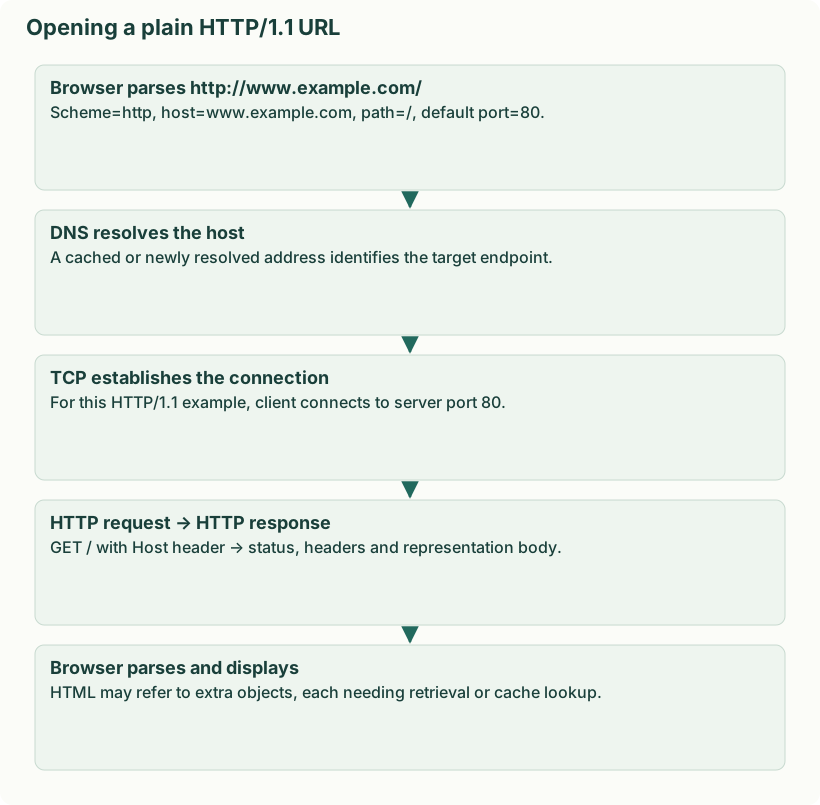
- Interpret the URL http://www.example.com/: scheme=http; host=www.example.com; path=/; absent explicit port, plain HTTP uses default port 80. A fragment identifier, if present, is handled by the client and is not sent as part of an HTTP target.
- Resolve the hostname using DNS, often via cached results and a recursive resolver. DNS finds an address; it does not download the Web page.
- For this plain HTTP/1.1 example, establish a TCP connection to the server on port 80. HTTPS additionally protects HTTP using TLS; do not add TLS to an explicitly plain-http example without stating a redirect or change of scheme.
- Send a request such as GET / HTTP/1.1 with Host: www.example.com. The server identifies the target resource, processes the request and prepares a response.
- Receive a status line such as HTTP/1.1 200 OK, response headers such as Content-Type, and the response body. A 404 response indicates no matching resource was found; redirects instruct the client to another target.
- The browser parses HTML, retrieves referenced objects as needed and renders the page. Caching may avoid transfers; persistent connections can serve multiple requests.
| Message component | Purpose |
|---|---|
| Request method / target | Requested action and resource; GET retrieves a representation, POST submits data for processing |
| Headers | Metadata, routing context, representation preferences and cache/connection information |
| Status code | Result class: 2xx success, 3xx redirection, 4xx client error, 5xx server error |
| Body | Representation or submitted content when present |
HTTP semantics are stateless: each request has its own meaning. Cookies/tokens can let an application maintain a login session; stateless does not mean “users cannot log in”. HTTP/1.1 and HTTP/2 commonly use TCP; HTTP/3 uses QUIC over UDP, so “HTTP always uses TCP” is not a universal statement.
Source: Final · 5 December 2025, original question paper page 2. Original marks retained; solution independently authored.