Computer Networks · TEE · read
DHCP: automatic configuration through DORA
ARP, RARP and DHCP
TEE · shared foundations and Units 3–4 · current syllabus 702AI0C023
Definition. Dynamic Host Configuration Protocol (DHCP) provides IP configuration parameters to clients and can lease reusable addresses for limited periods.
Simple meaning. DORA = Discover, Offer, Request, Acknowledge.
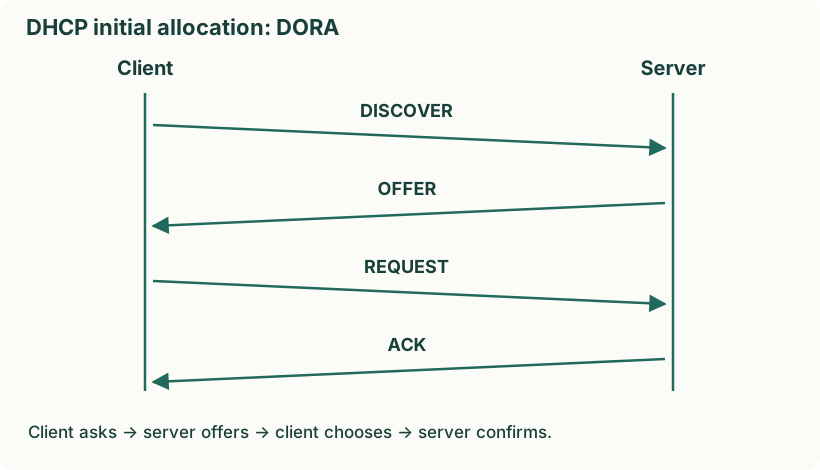
Diagram: DHCP initial allocation: DORA. Labels: DHCP initial allocation: DORA | DHCP initial allocation: DORA | Client | Server | DISCOVER | OFFER | REQUEST | ACK | Client asks → server offers → client chooses → server confirms.
Understand it step by step
- Discover: a new client looks for DHCP servers. With no configured IPv4 address, it commonly starts from 0.0.0.0 and uses broadcast discovery.
- Offer: a server offers an address and configuration, such as subnet mask, lease information and other options.
- Request: the client indicates the selected offer and requested address. In initial allocation this also informs other servers of its choice.
- Acknowledge: the selected server confirms the lease/configuration. The client can then use the address after the required checks.
- DHCPv4 uses UDP server port 67 and client port 68. A DHCP relay can carry requests between a client subnet and a server elsewhere; ordinary routers do not simply forward local broadcasts by default.
Practice question. Explain the four initial DHCP messages and state its purpose. [3 practice marks]
Answer
- DHCPDISCOVER: client searches for a server.
- DHCPOFFER: server proposes an address/configuration.
- DHCPREQUEST: client requests the chosen allocation.
- DHCPACK: server confirms the lease.
DHCP reduces manual configuration and supports controlled address reuse through leases.
Yaad rakho: Discover–Offer–Request–ACK; pehle D, phir O, phir R, phir A.